We have an over-arching agreement with Utmost International so that our IFA Firms can access their Offshore Bond products- which are both Isle of Man and Dublin domiciled.
You must also enter into an agreement with Utmost International for the Product to be available to you.
Once you have an agreement in place, please raise a Freshdesk Ticket requesting that we enable the configuration of your Portal to include The Offshore Bond Product and confirm to you when done.
You will then be able to open new Offshore Bonds, and transfer-in any existing Bonds which are currently held with other Custodians.
- You must complete the Utmost Offshore Bond application form and procedures and send into them, following their instructions and guidance.
- Money in and out of the Bond must be via Utmost’s bank account. When you open an Offshore Bond in the Portal you must add Utmost’s bank details to the Account record, and NOT those of the investor.
- Money in can arrive via electronic transfer or cheque and must be sent directly to the Offshore Bond Provider.
- Utmost will supply the illustration which includes their product fee, and all other relevant fees.
- Ensure that you can see and select the Utmost Offshore Bond product in your Portal. Your Platform Operations/ Support Team will be able to assist you and add the product to your view if necessary.
- Open the Utmost Offshore Bond wrapper/ account in the Portal.
- Ensure that the contribution expectation is as accurate as possible- and considers the fact that Utmost will be taking fees before money is sent to the Platform for investment.
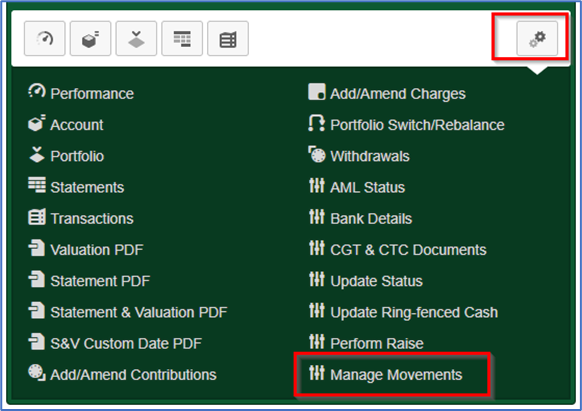
- When you receive Utmost’s ‘Payment Confirmation’ email- which confirms the exact amount being sent- you can use the ‘Manage Movements function in the ‘All Account Actions’ dropdown menu, to amend the expectation so that Straight Through Process can occur:
- You should complete the transfer section of the online application User Journey so that we have an expectation of the money that will be ultimately sent over from Utmost- once they have received it from the existing Custodian and processed it through their systems.
- However- Utmost will initiate the transfer request, so you can ignore the Transfer Authority Form.
- SS&C will not be dealing with this transfer work.
- SS&C Transfer team will handle the receipt and processing of in-specie transfers.
- Initial Adviser and Product fees are taken ahead of money reaching the investor’s account- so DO NOT enter these on the portal.
- Ongoing Adviser Charges (OACs) and Product fees are requested by the Provider on a Quarterly, monthly or annual basis, (See Fee Replenishment section below) so DO NOT enter these on the portal, but NOTE- these should be entered on the Provider’s application form where required.
- Platform fees (and DFM fees if applicable) are applied to the investor accounts monthly in arrears, via Portal functionality as usual.
- Once the account has been submitted and authorised, please raise a Freshdesk Ticket requesting that we rename the account as follows: “Utmost Int IoM Ltd ABC1234 Initial Surname of investor” for Isle of Man accounts, and “Utmost Pan Europe DAC LBC1234 initial surname of investor” for Ireland domiciled accounts.
- It is the IFAs responsibility to advise Utmost of the SS&C Account ID so that this can be used as a reference when money is sent to us for investment.
- Utmost will provide you with their reference number- typically HZRxxxxx
- This is a vital step to ensure that Utmost receive the Valuation information they need.
- If you do not do this Utmost will require you to provide them with Valuation information manually.
- Please ensure you do the following as soon as the Account is opened:
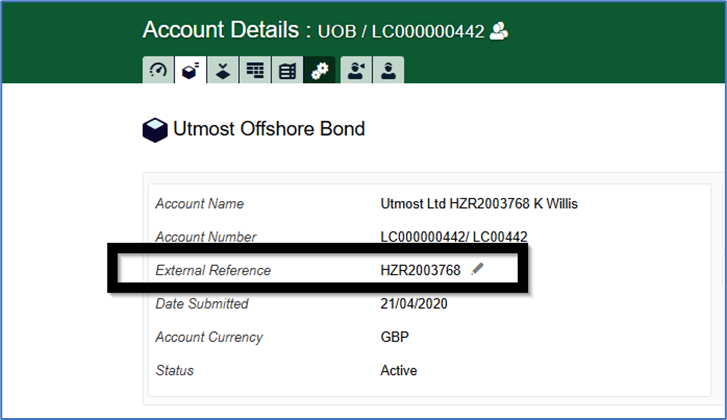
- Add the Utmost reference (i.e. HZR12345) to the Account Details screen “External Reference” field on the Portal:
This section covers how you can instruct ‘fee replenishment’ money to be sent to Utmost to ensure that they have sufficient cash to pay their Product fee and your OAC. And also how you instruct a Withdrawal- where an investor needs money out of their Offshore Bond.
- For Fee Replenishment, you will receive payment notices from Utmost.
- NOTE: Utmost allow IFAs to instruct these payments via the Withdrawal functionality in the Portal
- You must instruct the payment in the Portal as follows:
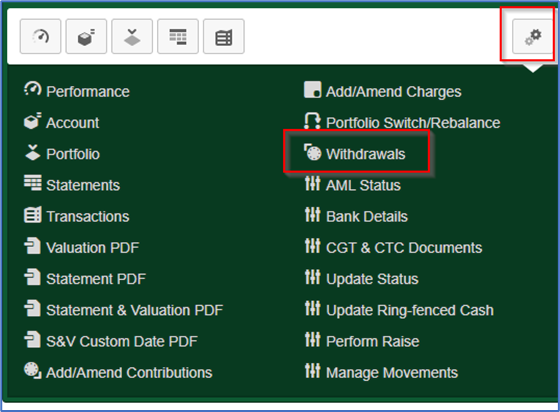
- Go to your investor’s Utmost Offshore Bond Wrapper, and in the All-Account Actions cog, select “Withdrawals”
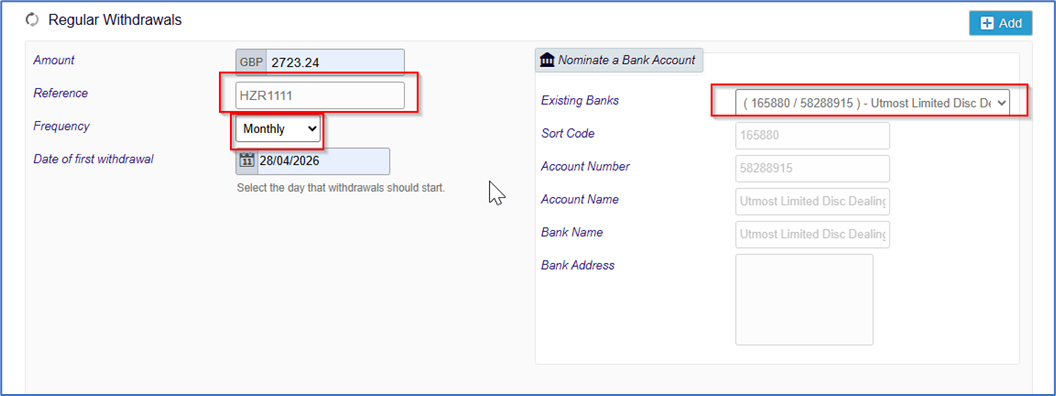
- Complete in full- ensuring that you use the correct Utmost Account number as the Reference- so that this withdrawal can be matched when it gets to the Client Money Bank Account at Utmost.
- Ensure that the Utmost Bank Account is selected (and NOT the personal Bank Account of the Investor).
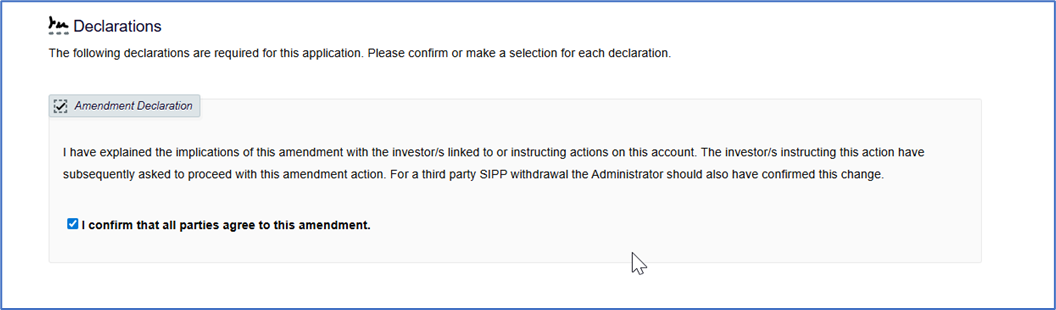
- Complete the Declarations Screen:
 And click Confirm Amendment:
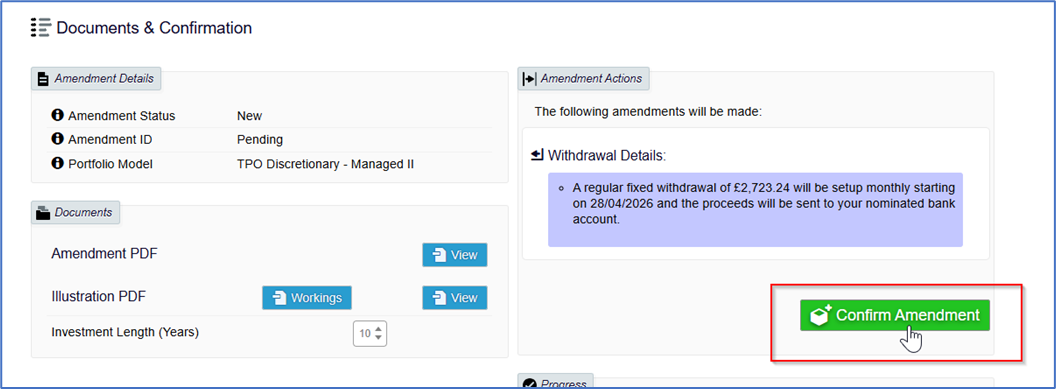 Using this functionality, you can easily set up a monthly, annual or quarterly payment as needed. The same method applies where an investor needs to take money out of the Offshore Bond. In this instance, the IFA will have been in contact with Utmost to arrange for the onward payment of the monies to the Investor’s Bank Account. All monies which leave SS&C must go to Utmost initially.
The payment shows up in the Account Details screen- under ‘Contributions/Withdrawals’ as follows: Your Relationship Manager at Utmost will be able to assist with queries relating to this product, including Trust related matters.
Was this article helpful?
That’s Great!
Thank you for your feedback
Sorry! We couldn't be helpful
Thank you for your feedback
Feedback sent
We appreciate your effort and will try to fix the article