Canada Life International (CLI) Offshore Bond
We have an over-arching agreement with Canada Life International (CLI) so that our IFA Firms can access their Offshore Bond products. (Isle of Man and Dublin domiciled)
You must also enter into an agreement with Canada Life International for the Product to be available to you. We will assist with an introductory meeting if needed, where the steps can be discussed and agreed.
Once you have an agreement in place, we will enable the configuration of your Portal to include The Canada Life International Offshore Bond Product and confirm to you when done. You will then be able to open new Offshore Bonds, and transfer-in any existing Bonds which are currently held with other Custodians.
The Offshore Bond is a product which your Investor buys from CLI, and which is then invested via the SS&C Platform. So, you must complete TWO Account Opening journeys: 1. the CLI Offshore Bond application AND 2. the SS&C Portal Online User Journey:
- You must complete The CLI Offshore Bond application form and send into them, following their instructions and guidance.
- Money in and out of the Bond must be via CLI’s bank account. When you open an offshore Bond in the Portal you must add CLI’s bank details to the Account record, and NOT those of the investor. These bank details will be validated against our back-office records.
- Money in can arrive via electronic transfer or cheque and must be sent directly to CLI.
- CLI will supply the illustration which includes their product fee, and all other relevant fees.
- Ensure that you can see and select The CLI Offshore Bond product in your Portal. Your Platform Operations/ Support Team will be able to assist you and add the product to your view if necessary.
- Open the CLI Offshore Bond wrapper/ account in the Portal.
- Ensure that the contribution expectation is as accurate as possible- and considers the fact that CLI will be taking fees before money is sent to the Platform for investment. I.e. the money forwarded to SS&C for investment does not include the cash balance which will remain with CLI to cover fees.
- You should complete the transfer section of the Contributions Step of the online application User Journey so that we have an expectation of the money that will be ultimately sent over from CLI- once they have received it from the existing Custodian and processed it through their systems.
- However- CLI will initiate the transfer request, so you can ignore the Transfer Authority Form. SS&C Platform Solutions will not be dealing with this transfer work.
- Initial Adviser fees, and initial product fees are taken ahead of money reaching the investor’s account- so DO NOT enter these on the portal.
- Ongoing Adviser Charges (OACs) and ongoing product fees are calculated by CLI and ‘Fee Replenishment’ is requested as required- often on a Quarterly basis, or other frequencies, so DO NOT enter these on the portal, but NOTE- these should be entered on the Provider’s application form where required.
- Platform fees (and DFM fees if applicable) are applied to the investor accounts monthly in arrears, via Portal functionality as usual.
- Once the account has been submitted and authorised, please raise a Freshdesk Ticket requesting that we rename the account as follows: “Canada Life Int Ltd a/c IOM 12345 (Policy Number) OR Canda Life Assurance (Ireland) DAV CLIAI 12345 (Policy Number)”
- It is the IFAs responsibility to advise CLI of the SS&C Platform Solutions Account ID so that this can be used as a reference when money is sent to us for investment.
- CLI will provide you with their Policy Number. Note: The Investor’s name should NOT appear in the Account name.
This is a vital step to ensure that CLI receive the Valuation information they need. If you do not do this CLI will require you to provide them with Valuation information manually.
Please ensure you do the following as soon as the Account is opened:
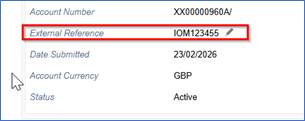
- Add The Offshore Bond Fund reference number (IOM or CLIAI 12345) to the Account Details screen “External Reference” field on the Portal:
CLI provide a cash forecast report to IFA Firms, and this can be used to determine how much is needed to transfer from SS&C to CLI to cover costs- i.e. their Product Fees and the IFA OAC.
- You must instruct the payment in the Portal as follows:
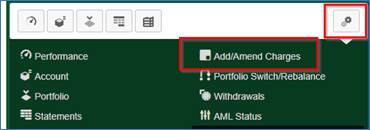
- Go to your investor’s CLI Offshore Bond Wrapper, and in the All-Account Actions cog, select “Add/Amend Charges”
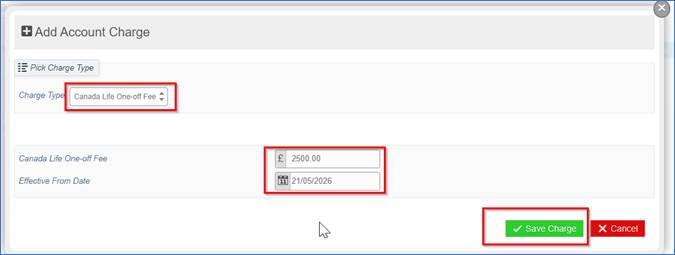
And follow the usual 3 step process.
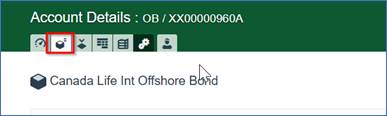
The fee appears in the General Charges section of the Account Details (cube icon) screen:

One-off and/or regular withdrawal/income requests are instructed via the Portal:
- Go to the All-Account Actions (double cog icon) dropdown and select Withdrawals:
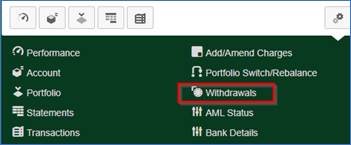
- Follow the standard three step user journey
- The money will be sent to the CLI bank account, to be forwarded to the investor.
- CLI will require confirmation from you that funds are being raised as necessary and the request for payment is in hand.
Your Relationship Manager at CLI will be able to assist with queries relating to this product, including Trust related matters.
Canada Life International | International Businesses | Canada Life UK
Was this article helpful?
That’s Great!
Thank you for your feedback
Sorry! We couldn't be helpful
Thank you for your feedback
Feedback sent
We appreciate your effort and will try to fix the article