Our functionality supports pension lifecycle management so an adviser can generate a Drawdown Illustration, submit a new withdrawal arrangement, and monitor any active withdrawal arrangements.
The Drawdown Arrangement:
- Enables the straight through processing (STP) of investor’s intentions.
- Provides a guided, end to end user journey.
- Eradicates the need for the paper applications process, whilst allowing required documents to be uploaded where and when necessary.
The purpose of this document is to guide Advisers on how to generate Drawdown Illustrations and complete Drawdown Arrangements through the portal.
This supports both Uncrystallised Funds Pension Lump Sum payments (UFPLS) and Flexi-Access drawdown.
This functionality does not support Capped Drawdown, Small Pots or Annuities (short term and fixed term) at present.
NOTE: Drawdown illustrations can be generated for any investor. Arrangements can only be submitted where the age of the investor is 55 years or above.
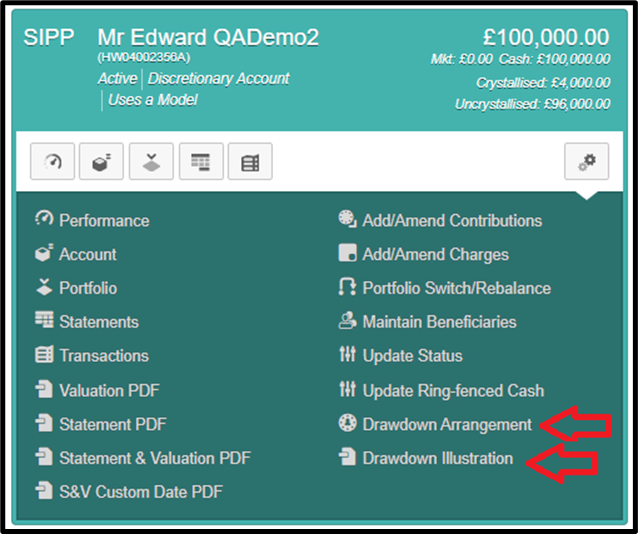
The adviser can create a drawdown illustration through the portal using the ‘Drawdown Illustration’ menu option.
Separately the adviser can submit a drawdown arrangement using the ‘Drawdown Arrangement’ menu option.
These two functions will be linked in a later release, to avoid double keying. At present the operate independently.
Once the Drawdown arrangement has been submitted and processed, a Retirement Request confirmation letter and a Lump Sum Allowance (LSA) certificate will be generated and uploaded to the Investor Documents area of the Investor’s record.
This is visible on the IFA Portal and on the Investor’s read-only Portal.
A notification email will be automatically sent to the investor to inform them. We plan to introduce a similar notification to IFA firms in a future release.
In the case of a regular PCLS request this will be generated for every RBCE, that is for every payment. If the investor has opted out of email communication, then these documents will be sent via post.
The different retirement types and drawdown types supported are explained in the sections below.
The adviser will be able to upload supporting documents such as a P45 or HMRC New Starter checklist, LTA/LSA Certificates and any Pension documents.
Payroll dates for income and regular PCLS are currently the 7th, 14th , 21St and 28th of each month.
For one-off non-taxable withdrawals (PCLS), the amounts can be paid out as soon as the cash is available.
If the cash is available, payment can be made the same day or the following working day, depending on what time the request is input.
If the cash needs to be raised, divestment will occur and then payment will be made once the sales have settled.
The drawdown illustration can be amended and generated as many times as required and must be saved locally.
The final version of the illustration should be saved in the Investor’s Document area. This is a manual process, using the blue Upload button.
We will introduce automatic saving of this document in a future release.
The illustration tool is laid out in the following sections:
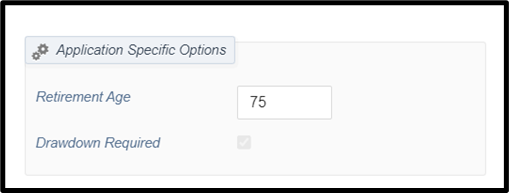
‘Application Specific Options’
Allows a specified retirement age to be set – note that this is just for the purpose of this illustration.
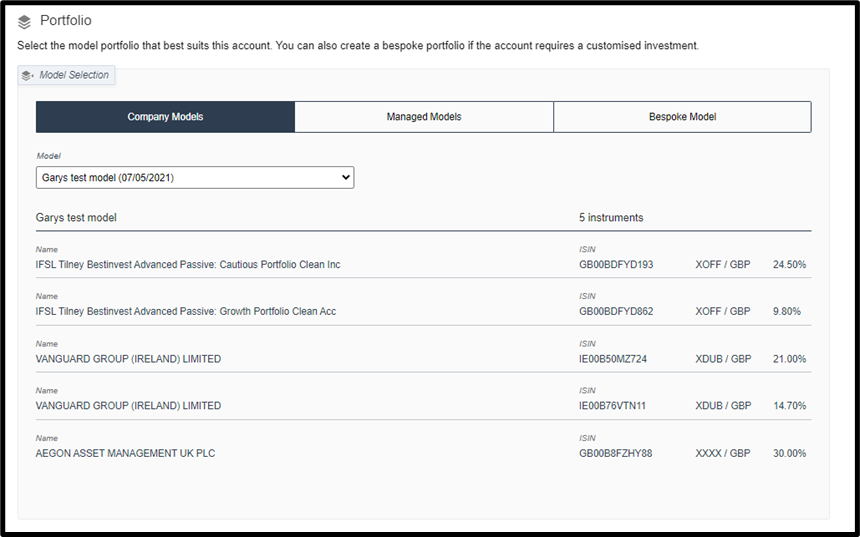
‘Portfolio’
This will be pre-populated with the current model the SIPP is invested in.
It also allows you to illustrate a different Model if required.
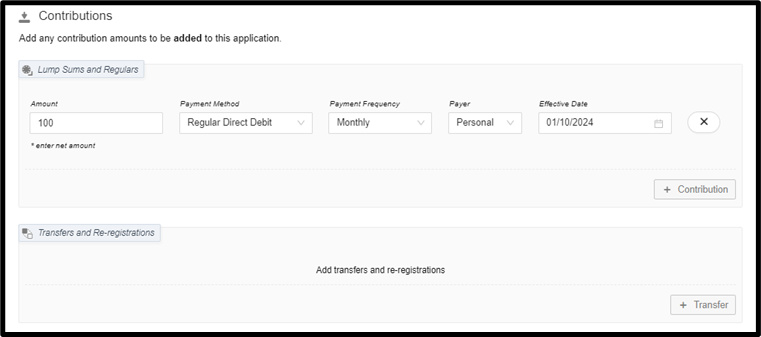
‘Contributions’
This will be pre-populated with any active regular contributions.
You may add any additional contributions or transfers as required.
NOTE: To switch between one-off and regular contributions, the ‘Payment Method’ must be set first; then the ‘frequency’ amended.
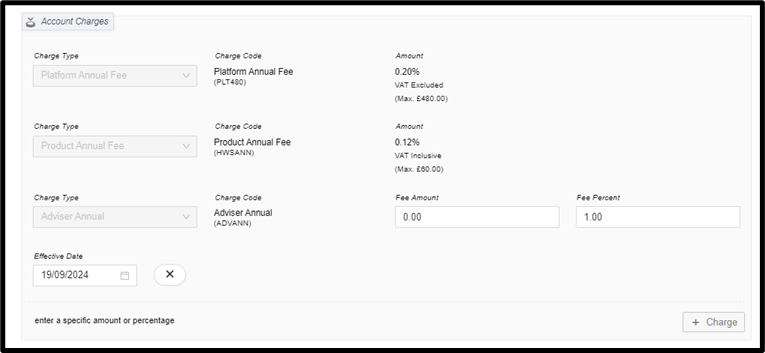
‘Account Charges’
Platform and Product fees are presented automatically and are read-only.
You may add adviser or other charges as required.
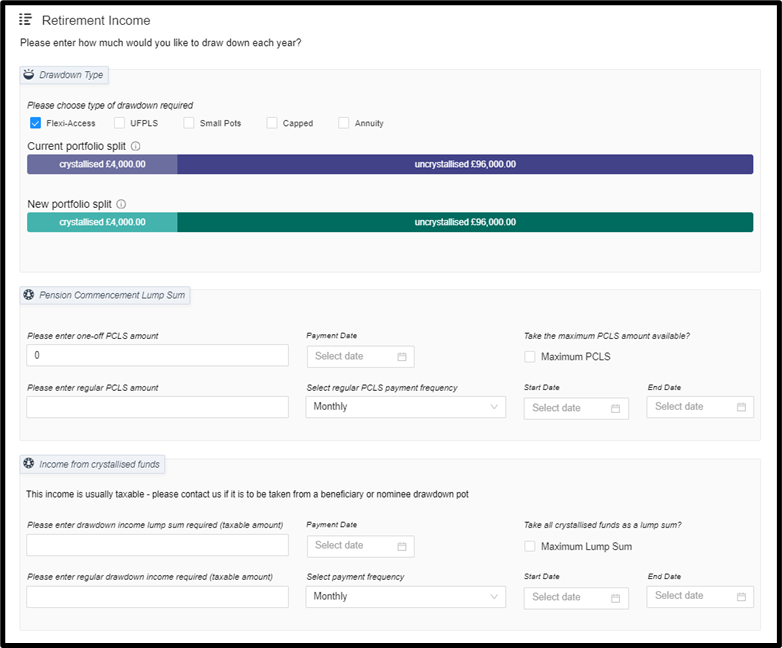
‘Retirement Income’
This is where the details of drawdown can be entered. It allows:
- One-off UFPLS withdrawals
- Or, one or a combination of the following Flexi-access withdrawals:
- One-off PCLS payment
- Regular PCLS payments
- One-off income payment
- Regular income payments
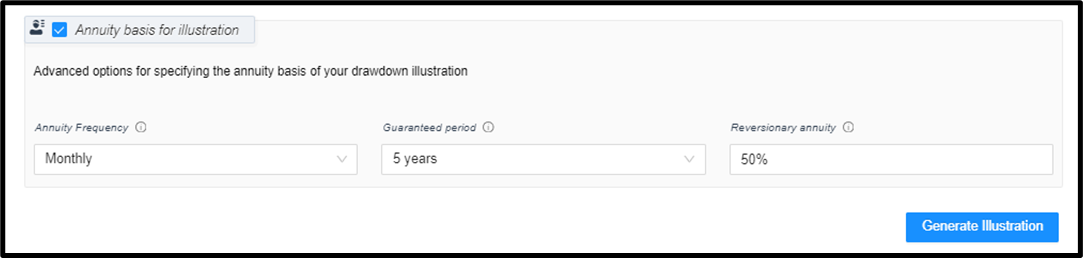
‘Annuity basis for illustration’
The final section allows the user to specify the annuity basis that will be used comparatively within the Illustration.
5.1 THE RETIREMENT INCOME SCREEN
Clicking on the ‘Drawdown Arrangement’ option will load an application for SIPP drawdown, allowing you to request a new drawdown arrangement or see any active ones.
You will first be presented with the Retirement Income screen (below). In the top section ‘Drawdown Type’ you can choose between 5 options: Flexi-access, Uncrystallised Funds Pension Lump Sum (UFPLS), Small Pots, Capped and Annuity – please note only one of these options can be selected at a time. The following sections detail each type.
The System is designed to automatically divest appropriately to fund these arrangements. You do not need to instruct a ‘Raise’ or ‘Ring-fence’ cash.

5.1.1 Flexi-access
This option allows the client to request any combination of one or more of the following:
- one-off Pension Commencement Lump Sum (PCLS)
- regular PCLS – often referred to as Drip-feed drawdown.
- one-off lump sum income from crystallised funds.
- regular income from crystallised funds.
The ‘Pension Commencement Lump Sum’ section has 2 separate lines: one-off requests and regular requests. Both can be requested within the same application.
5.1.1.1 PCLS option 1: the maximum amount available
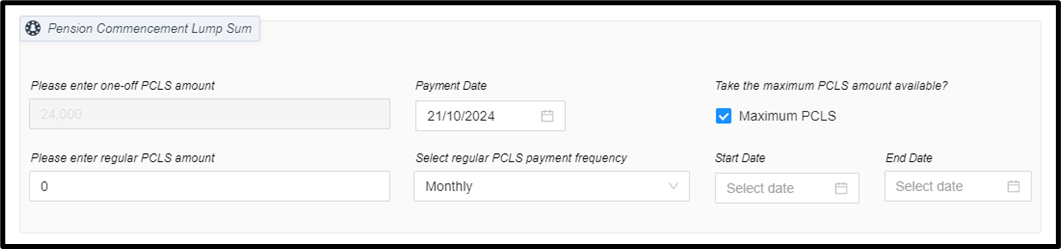
This can be requested by ticking the “Maximum PCLS” box and entering a payment date. This will request a PCLS withdrawal of 25% of the uncrystallised value as at the date of the benefit crystallisation event (please note the portal will show an estimated value, however this may not match the final payment due to changing portfolio values on the date of crystallisation). This maximum amount is paid in one lump sum and is not limited to payroll dates, so can be paid as soon as the funds are available or later if desired.
5.1.1.2 PCLS option 2: a fixed amount
Alternatively, a monetary amount can be requested to take only a portion of the client’s PCLS entitlement at this time, leaving a portion of their SIPP as uncrystallised funds. This partial drawdown amount is paid in one lump sum and is not limited to payroll dates, so can be paid as soon as the funds are available or later if desired.
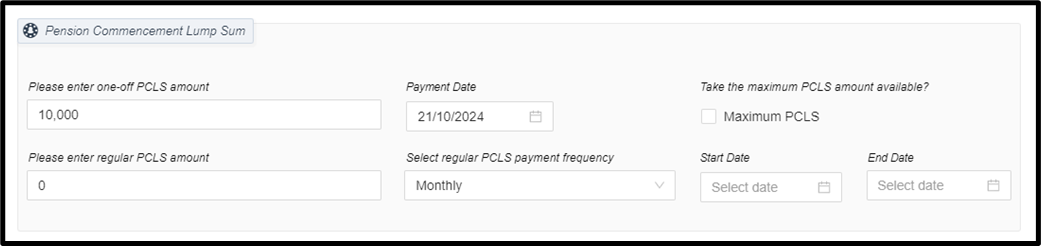
5.1.1.3 PCLS option 3: regular PCLS (Drip-feed drawdown)
- Regular PCLS can be requested to be paid Monthly, Quarterly, Half Yearly and Yearly.
- The amount entered is the per frequency amount.
- These payments will trigger a Relevant Benefit Crystallisation Event (RBCE) shortly before each withdrawal.
- The end date is optional and can be left open ended until either the uncrystallised funds deplete, the individual’s PCLS entitlement is all used, or a request is made to stop the payments.
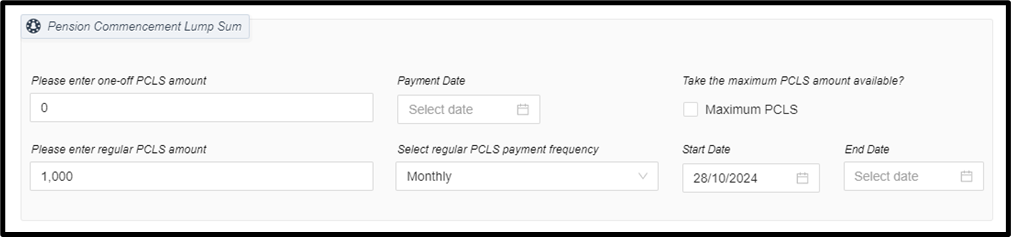
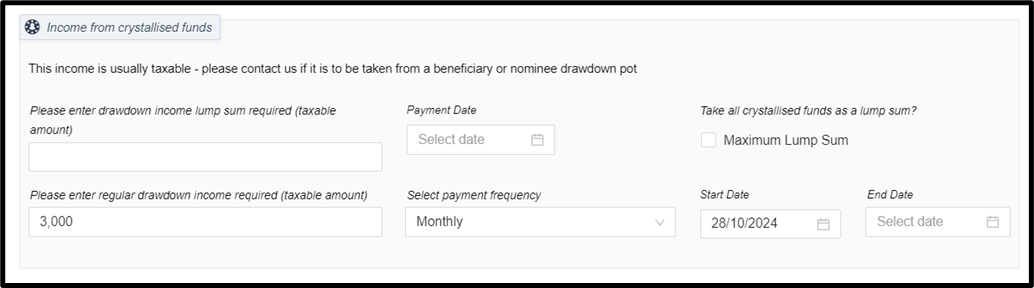
The ‘Income from Crystallised Funds’ section follows a similar layout.
5.1.1.4 Income option 1: the maximum amount available
A request can be made to withdraw all crystallised funds as a taxable lump sum on the selected date.
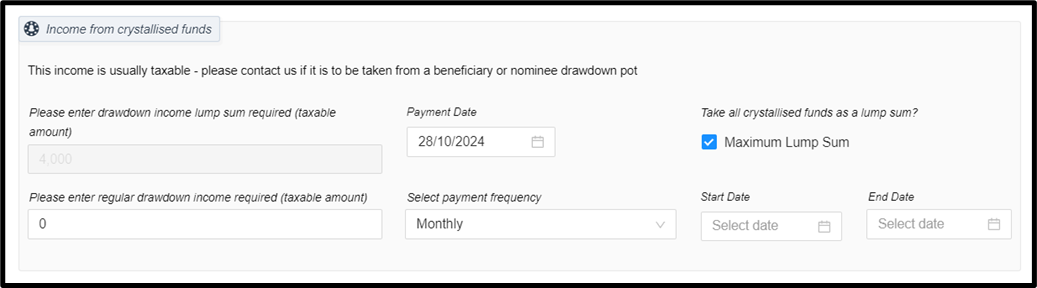
5.1.1.5 Income option 2: a fixed amount
A monetary amount can be requested to take only a portion of the client’s crystallised funds as a one-off taxable lump sum, leaving a portion of their SIPP as crystallised funds, to be used at a future date.
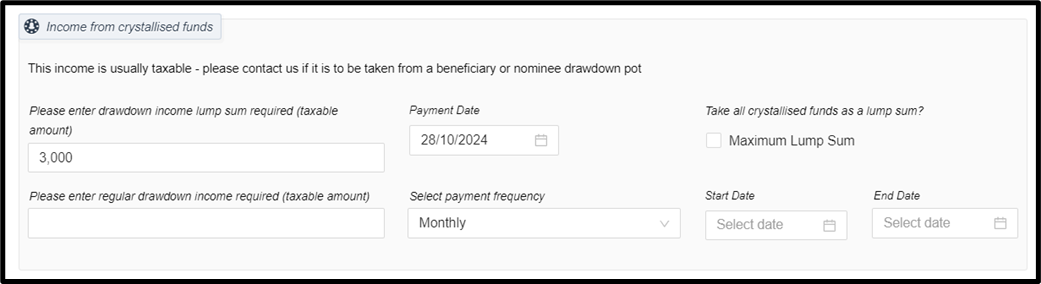
5.1.1.6 Income option 3: regular Income
- Regular income can be requested to be paid Monthly, Quarterly, Half Yearly and Yearly.
- The amount entered is the gross per frequency amount.
- The end date is optional and can be left open ended until either the crystallised funds deplete, or a request is made to stop the payments.
5.1.2 Uncrystallised Funds Pension Lump Sum Payment (UFPLS)
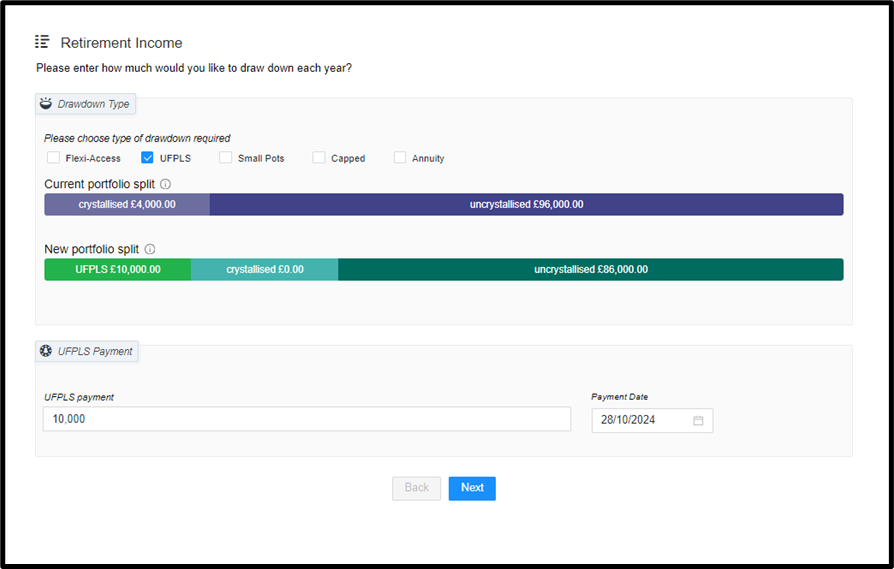
UFPLS arrangements are a way of taking uncrystallised pension funds in one go or as a series of lump sums. The client chooses not to take the initial tax-free sum (PCLS) but rather withdraw sums over time, as and when required, with the first 25% of each withdrawal paid tax free, and the remaining 75% paid after deduction of income tax.
- Ad-hoc / one-off UFPLS requests are made using this option.
- This option is only available from uncrystallised funds, and the investor must have enough Lump Sum Allowance (LSA) available to cover the UFPLS payment.
- Regular UFPLS is not supported, however amounts that are 25% tax free and 75% taxable can be instructed by entering a regular PCLS (6.1.1.3) and regular income (6.1.1.6) via the Flexi-access option, and ensuring the income is 3x the value of the PCLS. E.g. a regular PCLS of £100 and a regular income of £300 would be equivalent of requesting a regular UFPLS of £400.
5.1.3 Small pots
Small Pots withdrawals can be used where the value of the client’s pension does not exceed £10,000, and this can be taken as a lump sum with 25% tax free.
To select this option the following must apply:
- That the lump sum payment will extinguish the entitlement to benefits under the pension arrangement.
- That no more than two payments of this type from any registered pension scheme have been previously received by the client.
Currently all small pots requests are made via Freshdesk Ticket.
5.1.4 Capped Drawdown
A regular income is calculated using the client’s age and the Gilt Yields and Government Actuary Department (GAD) limits.
Capped Drawdown arrangements ceased on 5th April 2015.
- Capped drawdown to capped drawdown transfers-in are supported.
- Alternatively, existing capped drawdown plans can be transferred in and switched to a Flexi-Access plan. A Capped to Flexi-Access Switch form must be completed and signed, uploaded to the Investor’s document folder, and a request raised to us on a Freshdesk ticket for processing. The form can be found on the Knowledge Base.
5.1.5 Annuity
An annuity is a financial product which turns a lump sum from a client’s pension into a retirement income.
Annuities are not currently provided or supported by SS&C Hubwise. A client wishing to purchase an annuity would need to transfer their pension fund to a provider who supplies annuities. Details on how to instruct a transfer out can be found on the Knowledge Base.
5.2 SUPPORTING DOCUMENTS AND DECLARATIONS
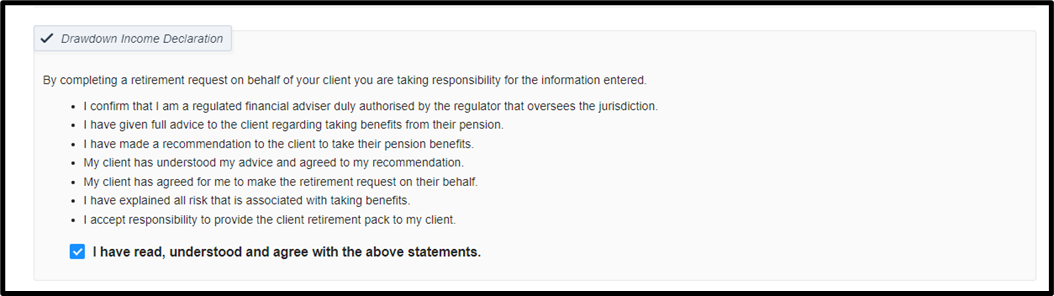
5.2.1 Drawdown Income Declaration
All drawdown arrangements are only permitted on a fully advised basis. If these declarations are not ticked, and the client does not wish to proceed on a fully advised basis, we cannot process the request.
5.2.2 Supporting Documents
Supporting documents can be uploaded directly to the investor’s document vault as part of this application journey.
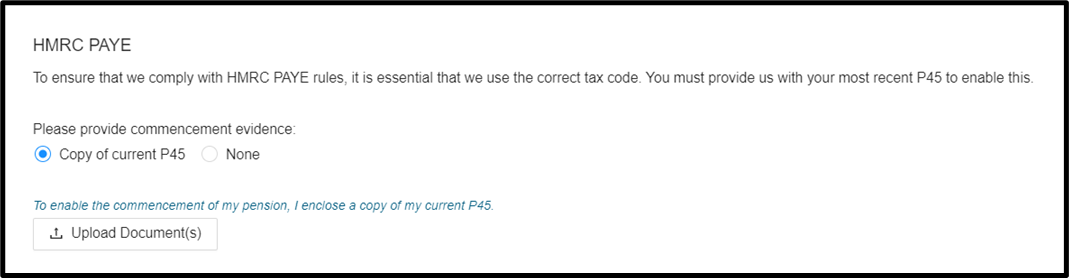
5.2.2.1 HMRC PAYE
If the client is taking any form of taxable income (UFPLS, regular income or one-off taxable lump sum) we require a new starter checklist OR a P45 for the current tax year, to ensure we use the correct tax code for the first payment.
- Select ‘Copy of current P45’ and click ‘Upload Document(s) to upload either document.
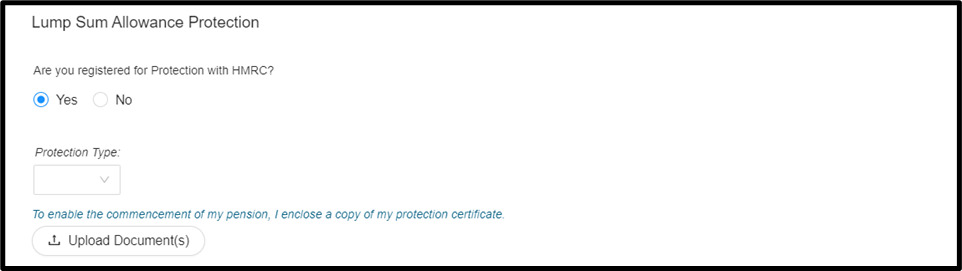
5.2.2.2 Lump Sum Allowance
Details of the member’s remaining Lump Sum Allowance is required if benefits have been taken after 6 April 2024, or details of the Lifetime Allowance and PCLS payments made if all benefits commenced prior to 5 April 2024
Any benefits not converted to the new Lump Sum Allowance will be converted on this benefit event. The standard Lump Sum Allowance is £268,275.00 and there are no plans for this to change. This applies to all pensions held by the member, excluding the State Pension.
Every time a Lump Sum is paid from the scheme the available Lump Sum Allowance and Lump Sum Death Benefit Allowance is reviewed to ensure the payment requested does not exceed the available allowance.
If the lump sum requested is greater than the available allowance, then any payment over the limit will be made and taxed at the member's marginal rate.
Where the member has Lifetime Allowance Protection, and the lump sum allowance will be greater than the standard allowance, evidence will need to be provided before any payment can be made.
The protection type can be selected, and a Lump Sum Allowance protection certificate can be uploaded.
5.2.2.3 Relevant Benefit Crystallisation Event
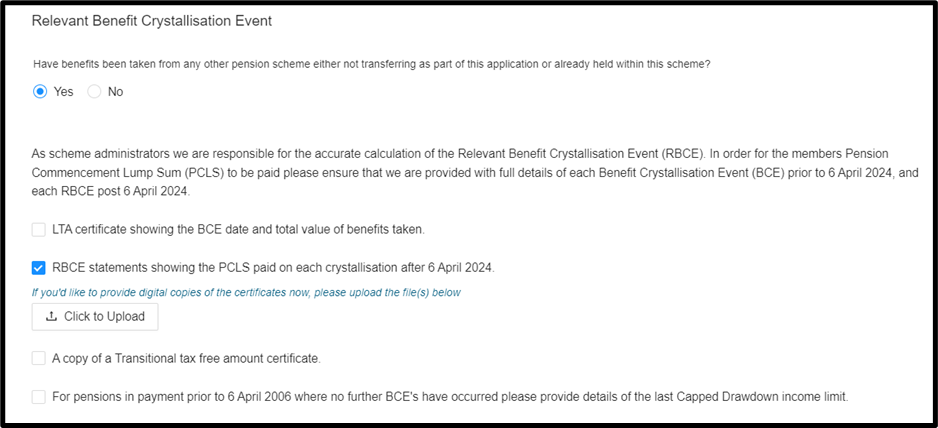
As scheme administrators we are responsible for the accurate calculation of the Relevant Benefit Crystallisation Event (RBCE). Please ensure that we are provided with full details of each Benefit Crystallisation Event (BCE) prior to 6 April 2024, and each RBCE post 6 April 2024.
Where relevant, document(s) from the following list must be provided for each historic BCE and RBCE:
- LTA certificate showing the BCE date and total value of benefits taken.
- RBCE statements showing the PCLS paid on each crystallisation after 6 April 2024.
- A copy of a Transitional tax-free amount certificate.
- For pensions in payment prior to 6 April 2006 where no further BCEs have occurred, please provide details of the last Capped Drawdown income limit.
Best Practice: Please raise a Freshdesk ticket to inform us when you upload any documents- and this will ensure that we pick these up in a timely manner.
5.3 PAYMENT OPTIONS
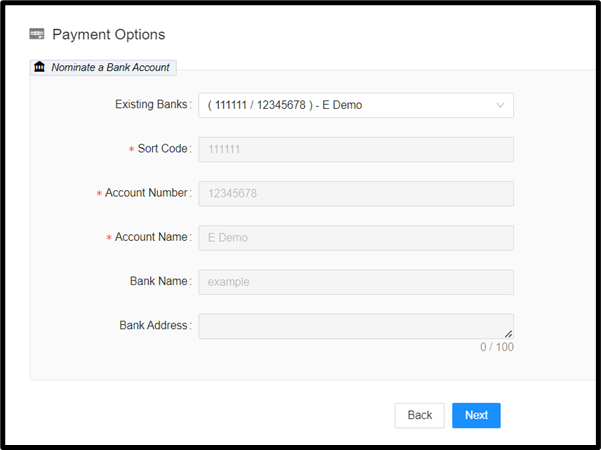
The bank account details of where benefits/income will be paid must be selected from a dropdown list of details which have previously been entered into the system.
Please note that payment can only be made to an account in the investor’s name - electronic verification checks will be carried out on the bank account before any payment is made.
If the check results in a query, we will request a certified true copy of the bank statement dated within the previous 3 months.
5.4 SUMMARY & SUBMISSION
The final step of the process will show you a summary of everything you have entered - please check this thoroughly to ensure you have not made any mistakes or forgotten to enter anything important.
You can go back to any step and amend before you click ‘Submit’.
Once submitted, our system will process the arrangement. Our SIPP Administration team will raise a Freshdesk ticket if anything further is required to progress payment.
To ensure the smooth processing of any drawdown arrangement relevant supporting documentation and any certified true copies of bank statements must be uploaded as required.
Payments will not be processed until all relevant verifications have been completed.
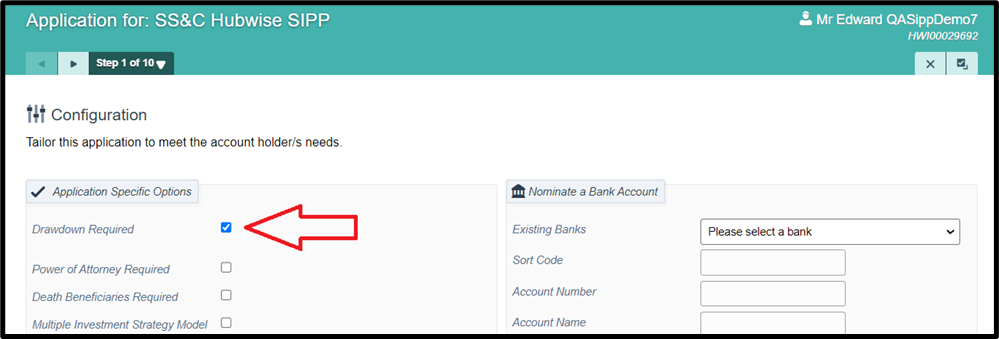
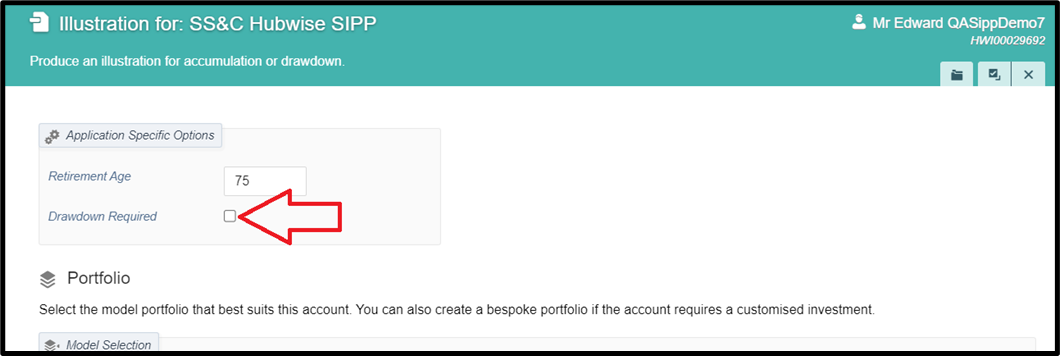
Selecting the ‘Drawdown required’ box will add the ‘Retirement Income’ screen (6.1) and the ‘Supporting documents’ screen (6.2.2) as additional steps in the new SIPP application process. Additionally, the ‘Drawdown Income Declaration’ (6.2.1) will be added to the declarations at the end of the application.
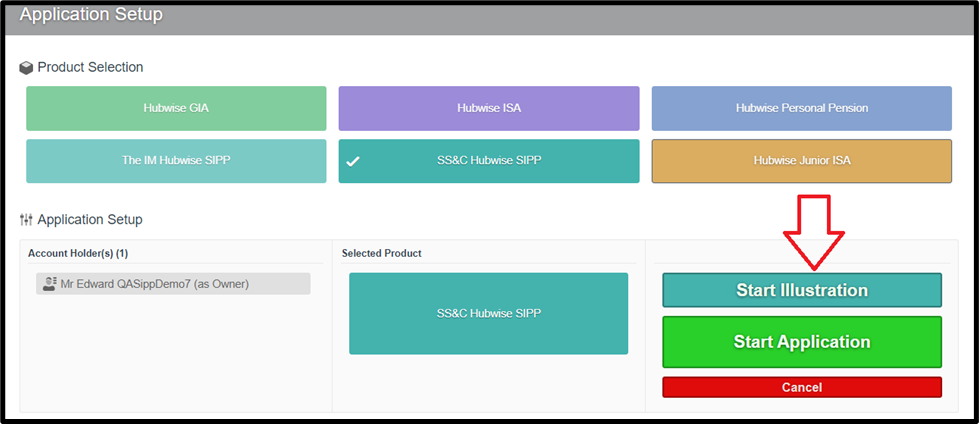
As well as being available in the New SIPP application journey, SIPP drawdown illustrations can be requested prior to initiating a new SIPP application using the following link.
Ticking the ‘Drawdown Required’ box will add in the ‘Retirement Income’ options, and from here it behaves the same as the illustration engine described in ‘Drawdown Illustration’ (5) above, but for a completely new case.
The ‘Start Application’ button will take you into the SIPP application journey, which will be pre-populated with the data you have keyed in to produce the illustration.

Can the client start taking cash as soon as a transfer is complete?
Yes, if they are aged 55 and over. Drawdown requests can be made during the SIPP application process. Please note that if the request is for maximum PCLS to be taken from a transfer then a ringfence will need to be applied for the expected amount to prevent straight through investment.
What are the payroll processing dates for drawdown/ when is income paid out?
The payroll dates are 7th, 14th, 21st and 28th of each month. Clients can choose one date or the other - leading to one payment monthly. There is a 7 calendar day cut off before each of these dates. If you miss the cut off, you can select the next available payroll date.
Where can crystallised/uncrystallised values be seen?
Crystallised and uncrystallised splits can be seen on the investor overview screen in the portal under the account number and are updated once daily at 10am. This value reflects the overnight valuation and may therefore change based on new cash received or withdrawals processed.
Can a drawdown illustration be produced?
Yes - this can be done through the ‘Drawdown Illustration’ menu option in the portal, as detailed in the above ‘Drawdown Illustrations’ (5) section.
Are taxable and non-taxable withdrawals treated differently and paid on different dates?
Yes - taxable payments and regular non-taxable (PCLS) can only be made on the payroll dates – 7th, 14th, 21st or 28th of the month. One-off non-taxable payments (PCLS) can be made at any time once the cash is available/divested.
What supporting documentation is needed to submit a new drawdown arrangement?
Information on supporting documentation can be found in the above section Supporting Documents (6.2.2). Where required, additional documentation can be uploaded via the portal to the Investor’s document folder. Best practice: Please raise a Freshdesk Ticket to inform us when you upload any documents- and this will ensure that we pick these up in a timely manner.
If the crystallised fund value drops and can no longer cover the remainder of the payments, will notification be provided?
Not at present. This should be monitored by the IFA Firm. We are looking at setting up a specific report that will help you to manage this and we will confirm when available.
Is one-off and regular UFPLS available?
You can instruct a one-off UFPLS on the portal, but we do not offer regular UFPLS. Regular UFPLS is not supported, however amounts that are 25% tax free and 75% taxable can be instructed by entering a regular PCLS (6.1.1.3) and regular income (6.1.1.6) via the Flexi-access option, and ensuring the income is 3x the value of the PCLS. E.g. a regular PCLS of £100 and a regular income of £300 would be equivalent of requesting a regular UFPLS of £400.
Where there are regular monthly payments set up for PCLS, are these individual Relevant Benefit Crystallisation Events?
Yes – With the introduction Drip-feed drawdown, regular PCLS payments each have their own RBCE.
Will you provide information on the Lump Sum Allowance (LSA) and Carry Forward?
In accordance with the HMRC Pensions Tax manual (PTM164400) the Investor will be sent an LSA certificate after every Benefit Crystallisation Event, and at least once a year if they are receiving pension payments and are under the age of 75.
The Investor is expected to monitor their own carry forward as this applies to all pension arrangements. If they contribute more than their annual allowance in any tax year, we will issue them with a Pension Savings Statement to assist with this.
I have ringfenced cash to use for income payments, is this correct procedure?
Please do not Raise and ringfence cash for income. The system sees ringfenced cash as off-limits, so will not be used for income payments. Our system will divest as appropriate for any arrangement.
The client wishes to change or cancel their Regular PCLS, and/or taxable income payment - how do we do this?
Please contact us via Freshdesk and we will stop the current schedule. You can then input a fresh one if appropriate. NOTE: the 7 working days lead time applies. If this cut-off is missed the change or cancellation will be applied to the following payment.
I cannot see drawdown arrangement in the All-Account Actions dropdown menu ?
- It could be that the investor is under 55 years of age
- It could be a permission issue
Please contact us via Freshdesk so we can investigate for you.
Was this article helpful?
That’s Great!
Thank you for your feedback
Sorry! We couldn't be helpful
Thank you for your feedback
Feedback sent
We appreciate your effort and will try to fix the article