Adding Employer and Employee Contributions (Hubwise SIPP)
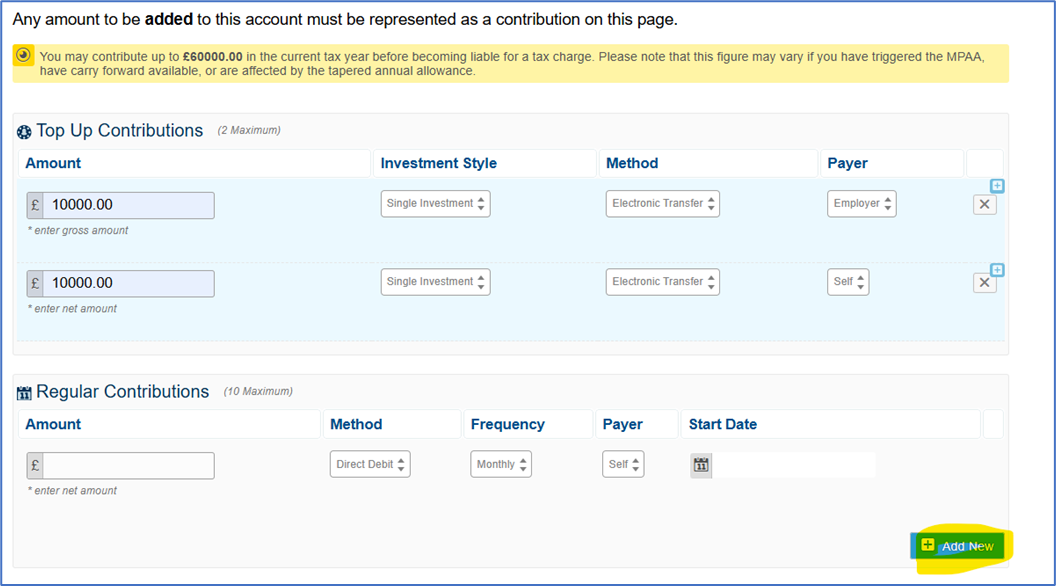
If you wish to add both employee and employer contributions to a Hubwise SIPP this can be completed in a single portal process.
Within the contributions section there is the option to add new when you have added a contribution and you can add one employer and one employee for both single and regular contributions.
For employer contributions SS&C Platform Solutions require the signed Direct Debit to be uploaded which is available in the application form generated during the application process.
Was this article helpful?
That’s Great!
Thank you for your feedback
Sorry! We couldn't be helpful
Thank you for your feedback
Feedback sent
We appreciate your effort and will try to fix the article
This content of this website is designed to give professional financial advisers information and tools that they can use to support their use of the SS&C Hubwise platform. It should not be used by private investors or any other persons