Ticket Categories - How to Choose the Right Option
To make it easier and quicker to submit your tickets, we’ve simplified the dropdown options.
Use the guidance below to select the correct category when raising a ticket.
Select Dealing whenever your query or instruction relates to any of the items listed below.
This includes anything involving trades, cash movements, fees, withdrawals, expectations, or dealing-related queries.
If your query starts as something else (for example, a deceased case or an RL360 enquiry) but later becomes a dealing instruction, please update the dropdown to Dealing once the instruction is clear so we can act promptly.
- Manual dealing request
- Phasing request
- Book cost query
- Contract note query
- Move cash between accounts
- Query about how to place a trade
- Manual switches / re-balances
- Cancellation request
- Price / valuation query
- Potential Detriment
- Withdrawal request
- Payment date query
- Regular withdrawal query
- Withdrawal rejection / failure query
- Payment options query
- Amend / delete expectation
- Cash received - no expectation
- Cash received - non-registered bank account
- Cash received query
- Direct debit query
- Failed direct debit
- Redress / compensation
- Payment notification
- Bank validation query
- AML
- ISA subscription query
- Bank account change - nominated
- Bank account change - secondary
- Close account / record
- APS request
- IHT payment
- Account closure request (withdraw/transfer)
- Ad hoc fee query
- Admin fee query
- Adviser fee query
- Fee linking
- Incorrect/Missed fee
- Profit / loss calculation
- Correction
- System discrepancy / mismatch query
- Drawdown query
- Withdrawal query
- Tax relief query
- Employer DD / AML
Select Technical Issue if your query relates to portal functionality or system performance.
If a technical problem is stopping you from placing a trade, please choose Dealing so the trade can be prioritised, and we’ll adjust the category afterwards to reflect the technical issue.
Please include as much detail as possible, along with screenshots where you can, to help us investigate and resolve quickly.
- Portal access query
- Login reset
- Display issue
- Identified bug
- Performance issue
- DTC error
- Document upload issue
Use this category for any concerns, dissatisfaction, or complaint about our service.
- Informal expression of dissatisfaction
- Complaint update
- Log formal / FOS complaint
Select Enquiry for all general questions or requests that don’t fall into another category.
- Amend narrative
- Add beneficiary
- Add LPA
- Address change
- Change person type
- Client linking
- JISA to ISA
- Name change
- Update LEI
- Update National Insurance
- Change of adviser / servicing firm
- Bespoke query
- Environment change
- Freshdesk setup
- Intelligent Office setup
- New request
- Link DFM models
- New firm onboarding / setup query
- Fund request - new request
- Company reports - help using company reports
- Company reports - MI query
- Company reports - new report request
- Open offer / notification
- Corporate action query
- Dividend reinvestment / rights election query
- Notification of death
- Process/Document query
- AJ Bell SIPP
- Alltrust SIPP
- Canada Life International
- Curtis Banks SSA
- Curtis Banks SIPP
- DA Philips SIPP
- Dentons SSAS
- Dentons SIPP
- Hornbuckle SIPP
- InvestAcc SIPP
- MW SIPP Trustees
- Rowanmoor SIPP
- TPO Invest SIPP
- Utmost Offshore Bond
- RL360 - New Application
- RL360 - Top Up
- RL360 - Withdrawal
- Dividend / distribution query
- Equalisation query
- Breakdown request
- DFM fee query
- Platform / product query
- SIPP fee query
- Contribution query
- Payment breakdown
- HMRC
- Training query
- Process guidance request
- Not listed
Select Transfers for all transfer-related queries or instructions (in or out, across all products).
Cash internal transfers between accounts should be raised under Dealing, not Transfers.
- Book cost query
- Change of agency
- Transfer form upload
- Transfer in update
- Transfer out update
- Transfer MI query
- Internal transfers (Cash Internal transfers between accounts should be logged under Dealing instead)
- Transfers between IFAs
- Transfer rejection / delay query
This option is for internal use only. You may see it if we are writing to you to share information or request details/action.
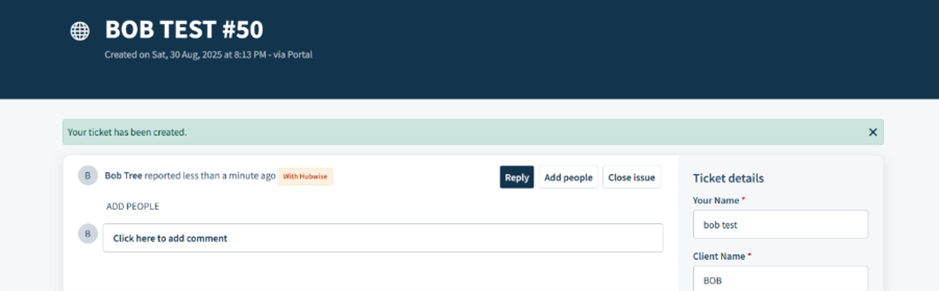
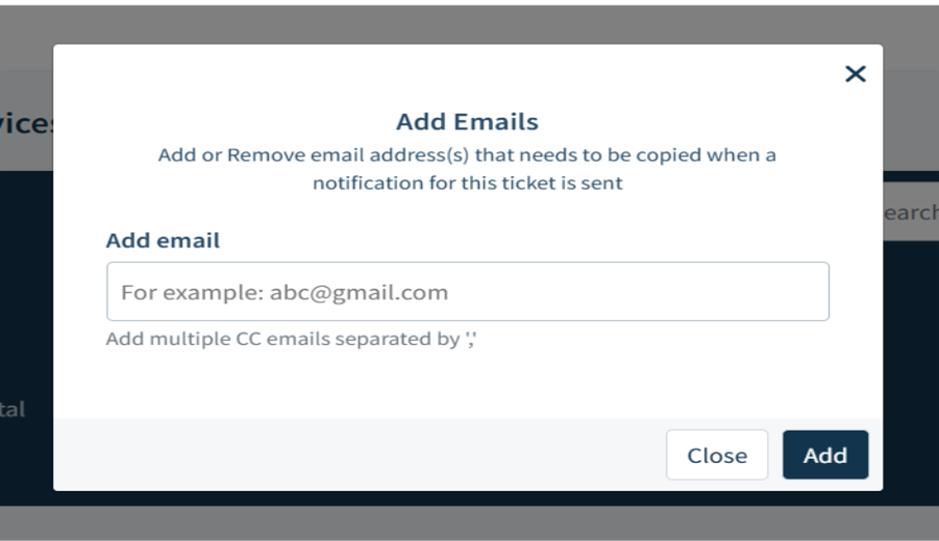
To help keep the right people informed, Freshdesk allows you to add CC recipients to a ticket.
Use this feature when someone else needs to see updates or provide input - but it must not replace the standard escalation process.
What it is: This lets you copy additional people into the ticket so they receive all update emails.
What you see: You can add colleagues, advisers, or anyone who needs visibility. They’ll receive the same notifications as the main contact and can reply directly if needed.
CC recipients do not have the ticket assigned to them and it won’t appear in their queue.
They simply receive the updates by email and their replies will be added to the ticket thread as normal.
Add people is not for customer use. It should only be used internally when you need to keep another colleague informed.
We have introduced several Freshdesk enhancements to improve efficiency and coordination across our teams.
These updates run in the background, but the summaries below explain what each feature does and how it supports a smoother service.
What It Is: An internal tool that automates certain actions on tickets, such as applying notes, updating statuses, or handling routine cases. For example, some tickets that don’t require action (like bounce backs) can be processed automatically. It helps our team focus on tickets that need attention and respond faster.
What You See:
- Your ticket experience stays the same - you continue to submit tickets and receive updates as usual.
- You won’t notice any automated actions being applied.
Parent & Child Tickets
What It Is: A way to split a single customer request into multiple tasks. Your ticket is the “parent,” and each ticket is a “child.”
What You See:
- You will only see the ticket you submitted.
- Internal child tickets created for processing your request are not visible.
- Any public replies or updates from us will appear as usual.
Behind the Scenes:
- Lets our team manage multiple steps from a single request efficiently.
- Each internal task is tracked separately to ensure faster, more accurate handling of your request.
Example: If you submit a Royal London application, that’s your “parent” ticket. We will then create an outbound “child” ticket to Royal London for their review. You will still only see your original parent ticket, but it will be linked.
What It Is: A way to connect separate tickets about the same issue internally, without merging them, so each customer’s ticket remains independent.
What You See:
- Your ticket remains separate and visible only to you.
- Tickets submitted by other partner firms reporting the same issue are independent and not visible.
- Updates are received as normal.
Behind the Scenes:
- Helps our team monitor broader issues efficiently.
- Allows private internal tracking without affecting your ticket experience.
Example: If several partner firms report the same portal issue, we create one internal ticket to manage the root cause.
Your ticket is then linked to that internal ticket, meaning:
- we can track all reports together, and when the issue is fixed, an update can be applied to every linked ticket automatically.
What It Is: When an old ticket is reopened, the system will now automatically create a new linked ticket.
What You See:
- Your original ticket stays closed but remains linked for full traceability and history. A new ticket is created to track the follow-up and will be handled as usual.
Behind the Scenes:
- This ensures SLAs are tracked and reported accurately.
By creating a new ticket, we can prioritise your request correctly rather than relying on an old ticket that may no longer reflect urgency.
Shared Ownership
What It Is: A way for multiple internal teams to work on the same ticket together, at the same time.
What You See:
- You’ll continue to see your ticket as normal and receive updates in the same way.
There’s no change in how you submit or track tickets.
Behind the Scenes:
- Instead of transferring a ticket between teams, we can now share it. This means the right team can work on their part of the request at the same time, while our Customer Service team remains your main point of contact.
Example: if you send us a dealing instruction that can’t be placed in the portal due to a technical issue, the ticket can be shared with both the Dealing team (to action the trade) and IT (to fix the portal). You’ll still get one clear response from us.
Was this article helpful?
That’s Great!
Thank you for your feedback
Sorry! We couldn't be helpful
Thank you for your feedback
Feedback sent
We appreciate your effort and will try to fix the article